No need to open the app.
Your Recovery score and the reason behind it, on your Home Screen or Lock Screen.
FOR APPLE WATCH, OURA, GARMIN & MORE
Wellplease turns what your watch or ring already records into plain answers: how you slept, how you’re recovering, and one small thing to try today.
Free for iPhone · iOS 27 or later · No account needed

Actual app screens · Sample data
See your day clearly.Last night, compared with your normal.
Spot what’s changing.Real changes, not day-to-day noise.
Keep your health data yours.It stays on your iPhone, not in our database.
A CALMER START
Wake up to how you slept, the reason behind it, and one small thing to try. Nothing to decode.
INSIDE THE APP
See how today looks, what’s been changing lately,
and one small thing to try next.
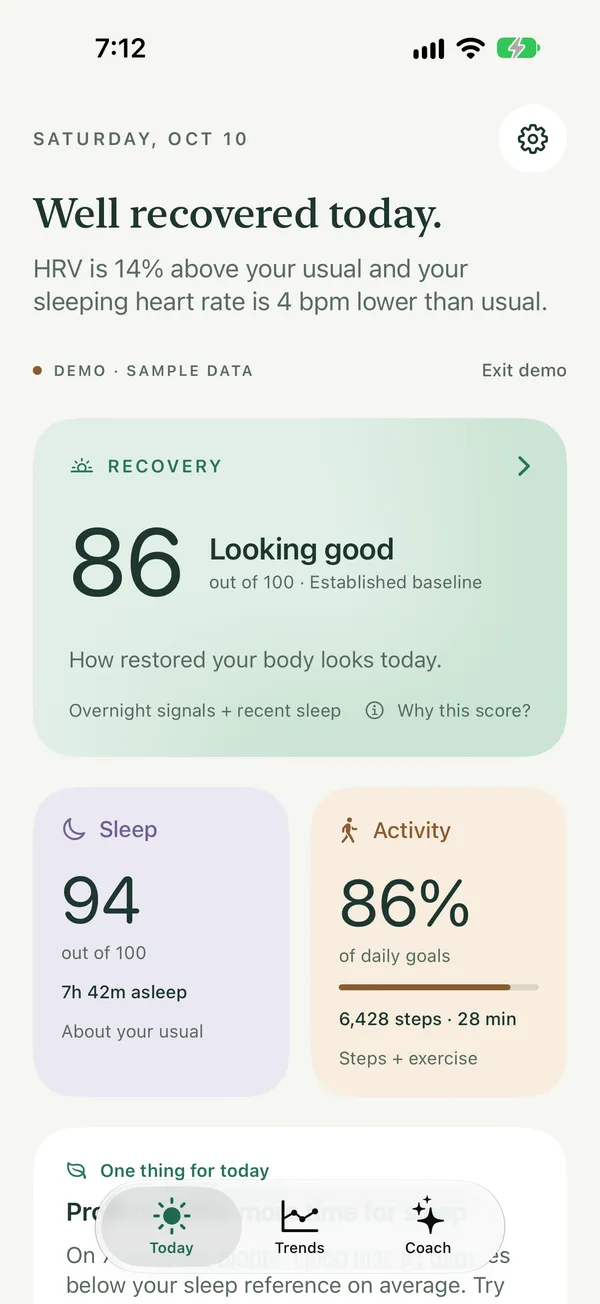
YOUR DAY, AT A GLANCE
Each day starts with a short headline that explains your readings and one gentle thing to do today, with sleep, recovery, and movement on one screen. It’s all worked out on your iPhone.
See how long you slept, your sleep stages, and what shaped your Sleep score.
Your sleeping heart rate, and HRV if your watch records it, next to your usual range, so you can tell if last night was typical.
Track steps and exercise against your goals. Once it knows your routine, it also shows whether you’re on your usual pace.
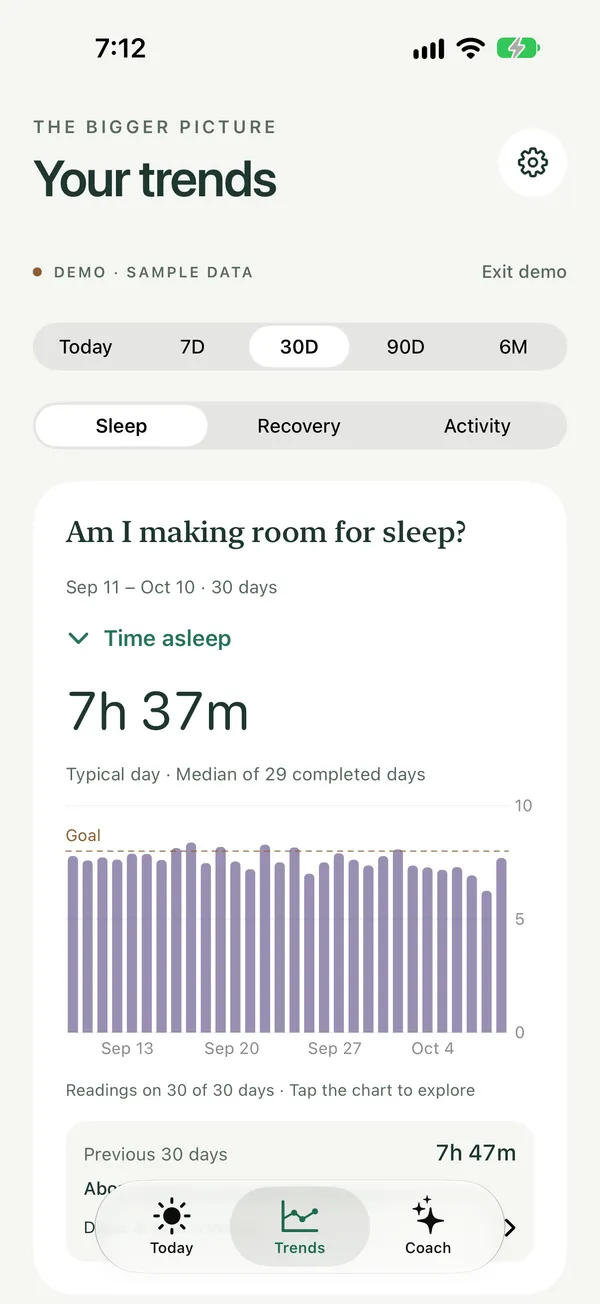
THE LONGER STORY
Trends answers three questions: Am I making room for sleep? How is my recovery changing? Am I moving consistently? It only calls something a change when it’s bigger than your normal ups and downs. Otherwise, it simply says “About the same.”
Look at today, the last week, month, or three months, or step back to six months. No digging through other apps.
Workout minutes and sessions from any app or watch, plus every other reading already in Apple Health.
Answer a quick check-in, like a late meal or a drink. Over time, you’ll see how those nights compare with the rest.
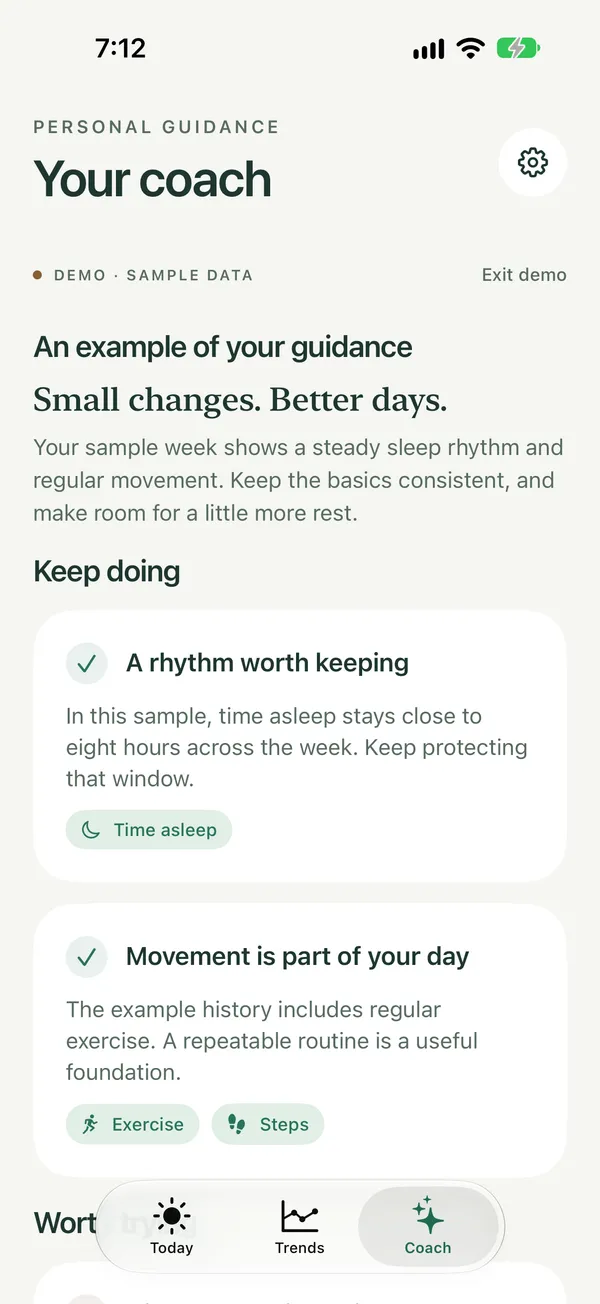
SMALL THINGS ADD UP
Ask the AI coach about your last few weeks. It points out what’s going well and suggests one small change, using only the summary you approve.
When Today spots something in your data, like a higher sleeping heart rate, it turns it into a question you can ask the coach.
Today’s guidance gives you one specific thing to do. Weekly reviews, with the monthly plan, find patterns across four weeks and set a focus for the week.
Turn a suggestion into a seven-day experiment and compare the nights before and after. It’s a way to learn what helps you, not a promise.
Nothing is sent until you’ve seen the summary and approved it.
Your Recovery score and the reason behind it, on your Home Screen or Lock Screen.
One notification after you wake, once last night’s sleep has synced. Off unless you turn it on.
In the evening, Today and the widget suggest a bedtime based on your sleep goal and when you usually wake up.
Free coaching included. No account needed.
CALM BY DESIGN
Most health apps want you checking them all day. Wellplease is made for a quick look in the morning, and then you get on with your day.
YOUR PRIVACY
Your Health history, scores, and check-ins live on your iPhone. We don’t keep a copy, and there’s no account to create.
Read our privacy policyScores, trends, widgets, and the morning summary are all calculated on your iPhone. We have no health database and no ad tracking.
Wellplease never changes your Health data. You choose what it can read, and you can erase everything it saved at any time.
You see what’s in the summary before it goes through our server to OpenAI. We don’t keep it, and OpenAI gets nothing that identifies you. OpenAI may hold requests for up to 30 days for safety checks.
SEE FOR YOURSELF
These are real screens from the app. Nothing reaches the AI coach until you’ve seen it and said yes.
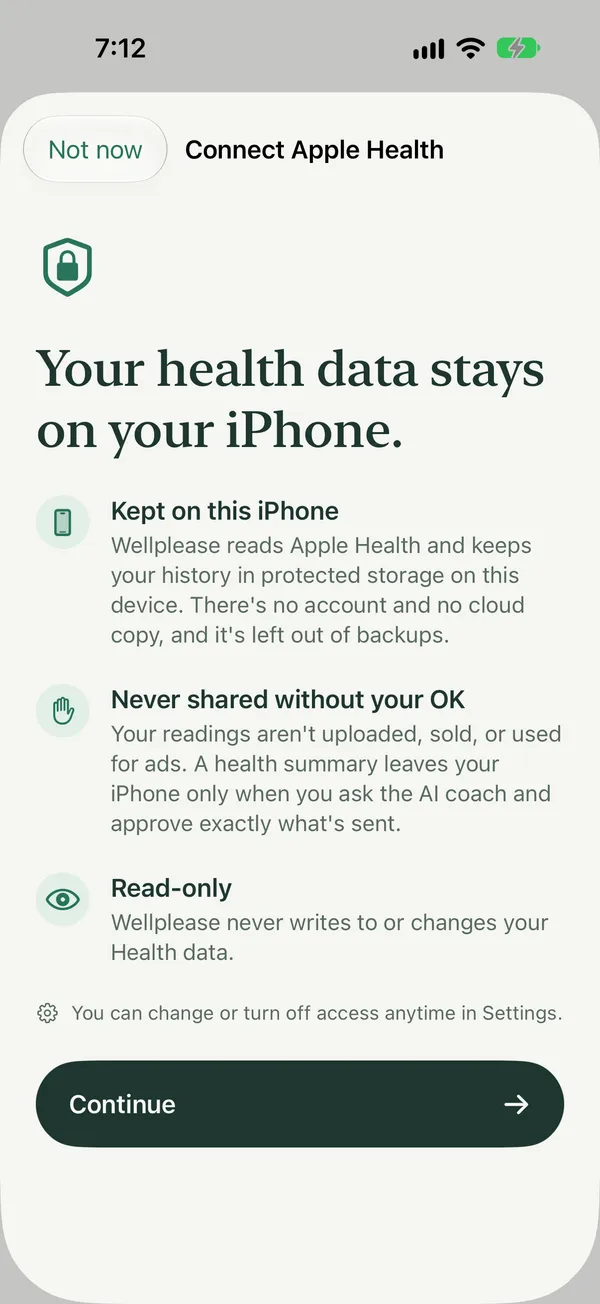
Wellplease explains what stays on your iPhone before Apple ever asks for permission.
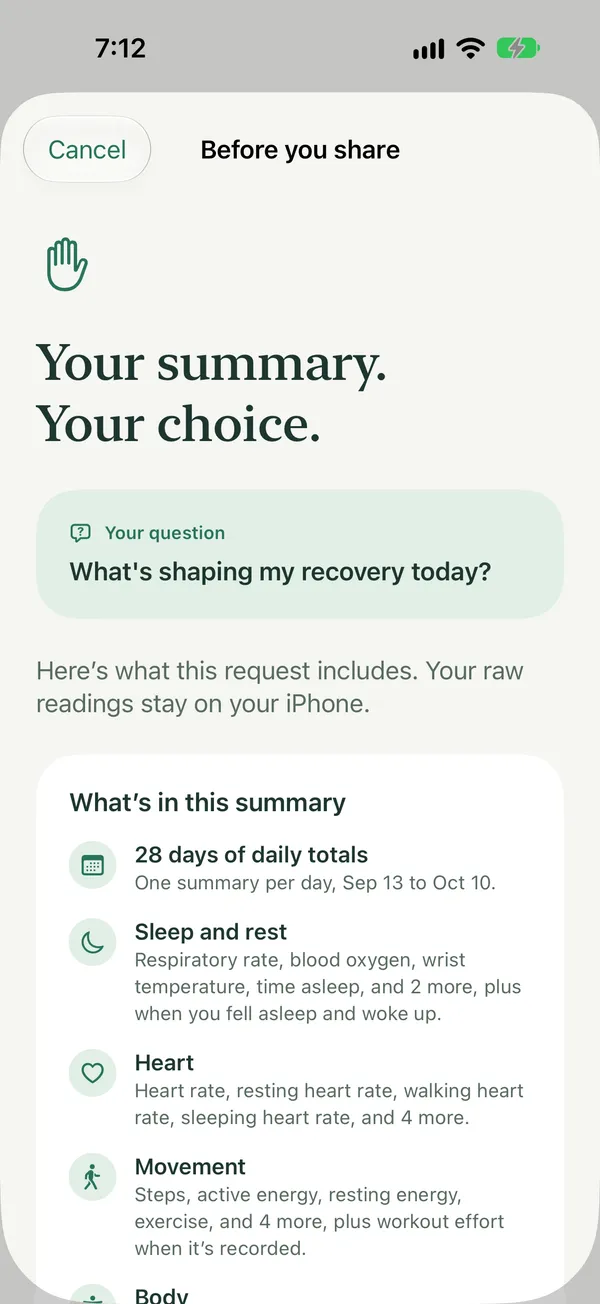
Before each coaching request, you see what’s included in plain words: which days, which kinds of readings, and your scores.
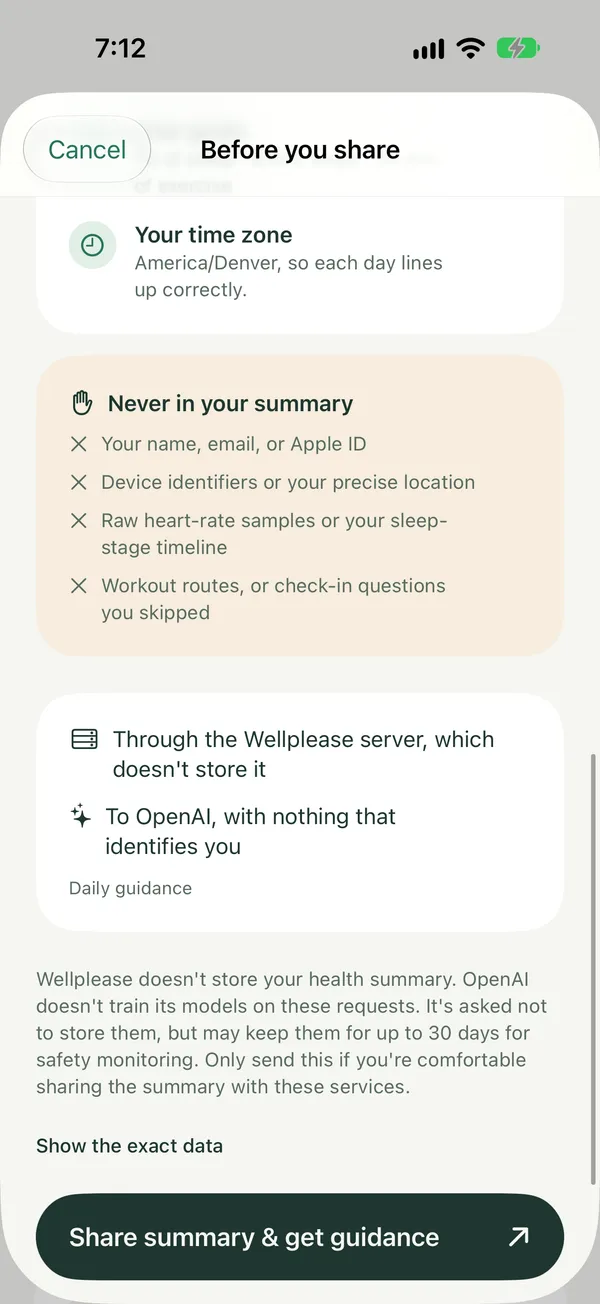
It also lists what’s never sent and where the summary goes. The exact data is one tap away if you want to check it.
Actual app screens · Sample data
Stays on your iPhone
Leaves only when you approve
Never
APP STORE PRIVACY LABEL
Every App Store app has a privacy label. Here are Wellplease’s answers, with what each one actually means. The official label appears on the App Store page once Wellplease is available.
Not used to track you
Data Linked to You
“Linked” means tied to your app’s security key, not to you by name. Apple counts that as linked, so we do too.
WORKS WITH WHAT YOU WEAR
Oura, WHOOP, and Garmin are great at what they do. Wellplease sits alongside them: it brings everything in Apple Health into one place and explains it in plain words.
Shares the fullest picture with Apple Health, including HRV, so every score has what it needs.
Turn on Apple Health in the Oura app and your sleep, heart rate, and steps come through. Oura keeps HRV in its own app, so Recovery uses your sleeping heart rate and sleep. You can also connect Oura to see its own scores in Wellplease.
Turn on Apple Health sharing in Garmin Connect for sleep, heart rate, steps, and workouts. Garmin keeps HRV in its own app too, so Recovery uses your sleeping heart rate and sleep.
WHOOP shares your sleep and workouts with Apple Health, so Sleep, Trends, and Activity work. Recovery needs overnight heart rate, which WHOOP doesn’t always share, so it may not appear.
What comes through depends on your device and what its app shares with Apple Health. Wellplease is independent and isn’t affiliated with Apple, Oura, WHOOP, or Garmin.
WHY I BUILT WELLPLEASE

Both of my grandfathers had heart attacks. I can’t change my genes, but I can change how I live, so I’ve paid much closer attention to my health ever since. I wear an Apple Watch and an Oura ring to get the best picture I can, including sleep tracking. Even so, I was never quite sure if what I was doing was actually helping.
I have four kids, and I want to be around for them for a long time. What I wanted was simple: wake up each day, understand how I’m doing, and know what to do with that. I also wanted to see the trends over time, so I’m listening to my body instead of guessing.
I didn’t want to hire a coach or add another appointment to my week, either. An AI coach that can look at weeks of my own data made more sense for me. It feels more personal, it only sees what I want it to, and it gives me something I can actually act on that day.
So I built Wellplease, and it’s changed my relationship with my health. I pay a lot more attention to my sleep and how much I exercise. I go lighter or harder in my workouts depending on my recovery. I’ve been feeling much better, and most importantly: it keeps my health top of mind.
I’ve loved building software for a living for more than ten years, as an engineer and CTO. Wellplease is my personal project, and I built it deliberately with no account, no health database, and control of where your data goes. There are no ads, and your health data stays on your iPhone. That’s how I want mine handled too.
Justin WrideFounder, Wellplease · Utah
PLAIN GUIDES
Short guides to the numbers people wonder about most, with sources.
QUESTIONS
Short answers. The details are in how the scores work.
How our scores workNowhere, unless you ask the AI coach. Your Health history, scores, and check-ins stay on your iPhone, and we never keep a copy. The first time you ask the coach, the app asks your permission to share with OpenAI, a third-party AI service, and you can withdraw it any time in Settings. Each time, you’ll see what’s in the summary first, and it’s only sent if you approve it. It passes through our server, which doesn’t store it, to OpenAI, which gets nothing that identifies you: no name, email, or IP address. OpenAI may hold requests for up to 30 days for safety checks. Today, Trends, and the widgets never need to share anything.
If it shares data with Apple Health, yes. Apple Watch works right away. For Garmin, Oura, and WHOOP, turn on Apple Health sharing in their app. What you see depends on what each one shares: Garmin and Oura keep HRV in their own apps, so your Recovery score comes from your sleeping heart rate and sleep instead. You don’t need a new device.
Yes, and no subscription is needed. Scores, trends, and widgets are free, and there’s no account to create. The AI coach is free too: one guidance request every 24 hours. An optional monthly plan, coming with the App Store release, adds weekly reviews, a deeper look at your last four weeks, and more guidance. If the coach is ever paused because of heavy demand, everything else keeps working.
Wellplease reads 36 kinds of Apple Health data, including sleep stages, heart rate, HRV, steps, exercise, active energy, breathing rate, VO₂ max, wrist temperature, and any nutrition you log. Trends points out real changes and, after a few weeks of check-ins, how your habits line up with your nights. Anything that isn’t recorded stays blank instead of being guessed.
Share only what you’re comfortable with. Wellplease works with whatever Apple Health gives it. If something it needs is missing, like sleep or heart rate, the app tells you which scores are affected and how to turn it on. That note stays until the data arrives, so a missing piece never looks like a bad night.
No. When you connect, choose to share your past Apple Health data too. Wellplease can then learn your usual ranges and show six months of trends on the first day, instead of starting from scratch.
Sleep looks at how long you slept against your goal or seven hours, whichever is higher, plus how much you were awake and how regular your timing is. Recovery compares your sleeping heart rate and HRV with your own normal, along with last night’s sleep and your past week. Activity shows progress toward your step and exercise goals. Tap any score to see what went into it. They’re wellness estimates, not medical measurements, and the AI coach can get things wrong, so neither replaces a doctor.
Wellplease is coming soon to the App Store. Leave your email below and we’ll let you know the day it’s available. You’ll need an iPhone with iOS 27 or later. Once it’s installed, connect Apple Health and choose what to share, or try the demo with sample data first.
COMING SOON TO THE APP STORE
How you slept, how you’re recovering, and what to try next.
Free for iPhone · iOS 27 or later
Wellplease is coming soon to the App Store. Leave your email and we’ll let you know the day it’s available.
We’ll email you when Wellplease is on the App Store.
Save your personal link to leave the list